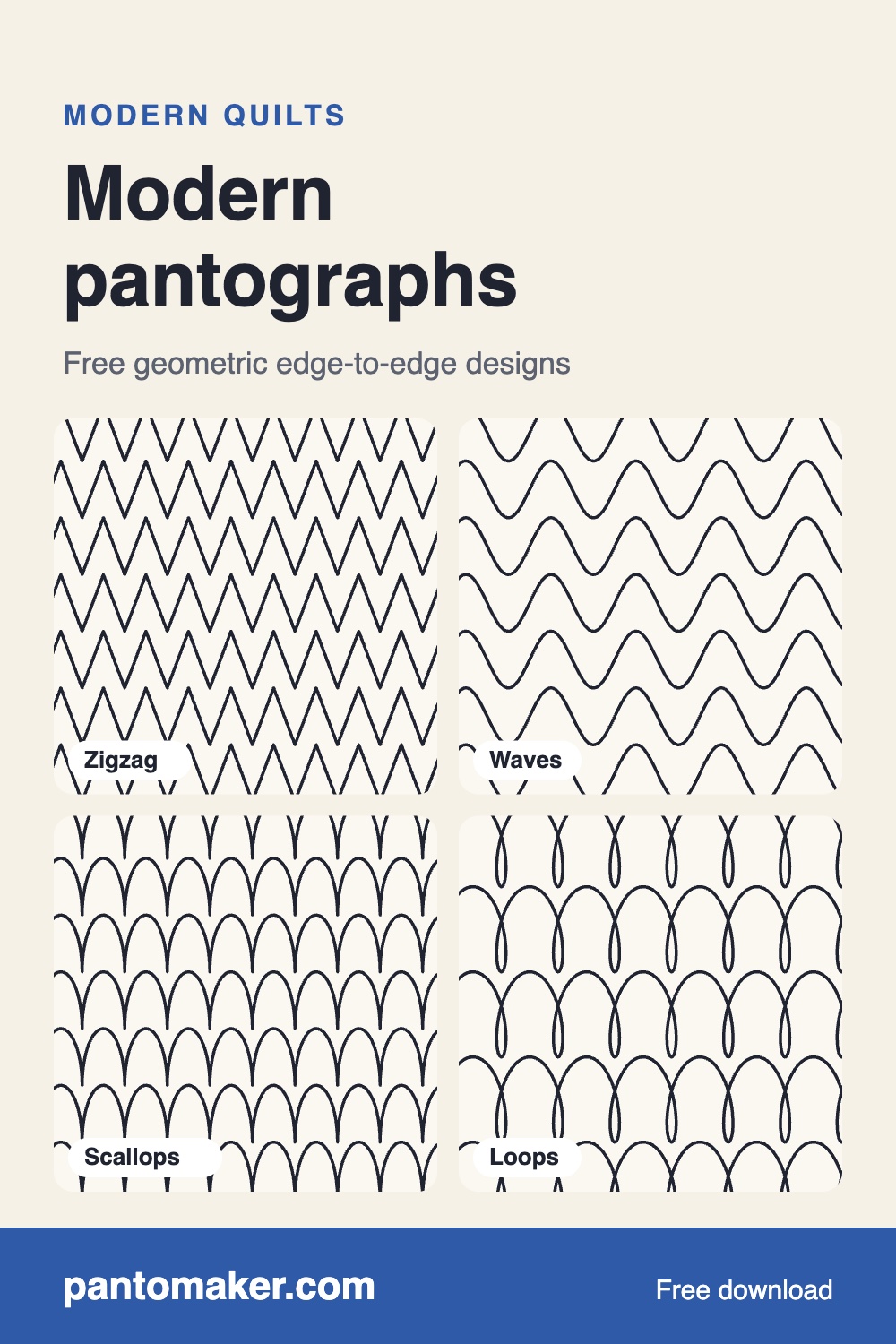
Modern pantographs for modern quilts
Six free geometric and minimal edge-to-edge designs for modern quilts: Zigzag, Waves, Loops, Scallops, Meander and Clamshell. Each is one ZIP with a printable paper pantograph (PDF) for hand-guided quilting and digital files for computerized longarms (QLI, HQF, IQP, DXF, PAT, BQM and more), with no sign-up. Stitch them on any quilt, including quilts you sell. Below: the downloads, what makes an all-over design read as modern, and how scale and row settings change the look.
Free modern pantographs (PDF + longarm files)


- Zigzag is straight lines and sharp points: four peaks per 12 in repeat at the library size, with a Peak height setting for flatter or steeper chevrons.
- Waves is one smooth curve up and down that never crosses itself. Its Wave depth setting takes it from a gentle ripple to a deeper swell.
- Loops cross themselves in a steady rhythm, a playful line that suits bright solids.
- Scallops are round arches on a baseline, the curved counterpart to the zigzag.
- Meander is a relaxed, lobed line that never crosses itself, the softest of the six.
- Clamshell is shells of three echoing arches. PantoMaker shifts every other row half a repeat for it, so the shells nest like fish scales.
Six more classic designs are free the same way in the free pantograph library.
Design your own modern pantograph
Modern quilts often want a line of your own: a skinny chevron, a single arc, a stretched loop. In PantoMaker you can draw a repeat with a mouse, finger or stylus, or change a built-in design's size and shape, and see it across your whole quilt for free. PantoMaker Pro ($19, paid once, no subscription) adds downloads of your own drawn designs in every machine format, converting SVGs and pattern files you already have, alternate-row layouts, every seasonal and holiday design all year, paper pantographs of any design, and your name and copyright notes inside every file. See what's free and what's Pro.
What makes a pantograph read as modern
- Simple geometry. Lines, points and plain arcs rather than feathers, flowers or pictures. Zigzag, scallops and clamshell are geometry at their simplest.
- Larger scale. Big shapes with open space between them look calm and deliberate; the same design small reads as traditional all-over texture.
- One steady line across the whole quilt. Modern quilts are often big blocks, improv piecing or wide areas of solid fabric. An edge-to-edge line that ignores the seams ties them together without competing with the piecing.
- Room for negative space. On a quilt with large background areas, the quilting is part of the design, so a clean, even line matters more than on a busy print.
Scaling up for negative space
The library sizes are comfortable defaults; for a modern look, try them larger. In PantoMaker, open a design, tick Keep proportions and raise Repeat width so the row height follows. The classic designs are free at any size. Here is what a 50% scale-up does on a 60 × 72 in throw, with rows running 2 in past each edge and spaced at their own height (numbers from PantoMaker's own layout code, rounded):
| Design | Repeat × row height | Rows | Stitching |
|---|---|---|---|
| Zigzag | 12 × 4 in | 20 | about 115 yd |
| Zigzag | 18 × 6 in | 13 | about 75 yd |
| Waves | 12 × 4 in | 20 | about 70 yd |
| Waves | 18 × 6 in | 13 | about 45 yd |
| Loops | 12 × 6 in | 13 | about 90 yd |
| Loops | 18 × 9 in | 9 | about 65 yd |
| Scallops | 12 × 4 in | 20 | about 120 yd |
| Scallops | 18 × 6 in | 13 | about 80 yd |
Bigger is faster and softer, but there's a limit: the open spaces must stay within your batting's maximum stitching distance (it's on the package), and the row height must fit your machine's usable quilting space. What size pantograph do I need? explains both.
Flipping and offsetting rows
Row settings change how a simple design looks across the quilt without changing the design itself. Under Your quilt in PantoMaker there are two free options:
- Flip every other row upside down mirrors rows 2, 4, 6 top to bottom. Try it on Zigzag or Waves to change how neighbouring rows meet.
- Shift every other row half a repeat offsets rows 2, 4, 6 sideways, so the shapes in one row sit between the shapes in the next.
Combine them with Row spacing: equal to the row height, the rows just touch; smaller, they nest into each other. The whole-quilt preview shows every row, so compare a few settings side by side before you stitch. The paper pantograph shows the shifted or flipped neighbouring rows as guides; on a computerized longarm, the file is one repeat, so set the same flip and offset in your quilting software. For two different designs on alternate rows (zigzag with waves, say), choose Alternate rows: the preview is free, and downloading alternate rows is part of PantoMaker Pro.
Straight lines and your own geometry
Freehand drawing in PantoMaker is smoothed, which suits curves. For crisp straight lines and exact angles, such as squares, steps or a long, low chevron, draw the line in a vector app like Inkscape or Illustrator, export it as an SVG and open it in PantoMaker to preview it across your quilt; converting it to machine files is part of PantoMaker Pro. How to design a pantograph covers the rules (one line, left to right, ending level), and pantograph design software compares PantoMaker with Pro-Stitcher Designer, Art and Stitch, Creative Studio and Inkscape.
Thread: blend or contrast
- Blending thread (the background colour, or a neutral grey) keeps the quilting as texture and lets bold piecing lead. It also hides small wobbles.
- Contrasting thread makes the line part of the design: a dark zigzag on white, or a bright thread on a solid. Contrast shows every stitch, so it suits a design you're comfortable with.
- On a quilt with large solid areas, a thread one shade darker or lighter than the background is a middle path: the line shows on the negative space without shouting.
New to edge-to-edge?
Waves, Meander, Loops and Scallops are also the four designs in easy pantographs for beginners, with tips for a first pantograph quilt. Zigzag's points and Clamshell's even arcs show every wobble, so they make good second or third quilts.
Before you stitch
As with any new pantograph, load it (or tape up the paper), check the size, and stitch a test row on scrap with the same batting and thread. If something looks wrong, email support@pantomaker.com with your machine and software version.