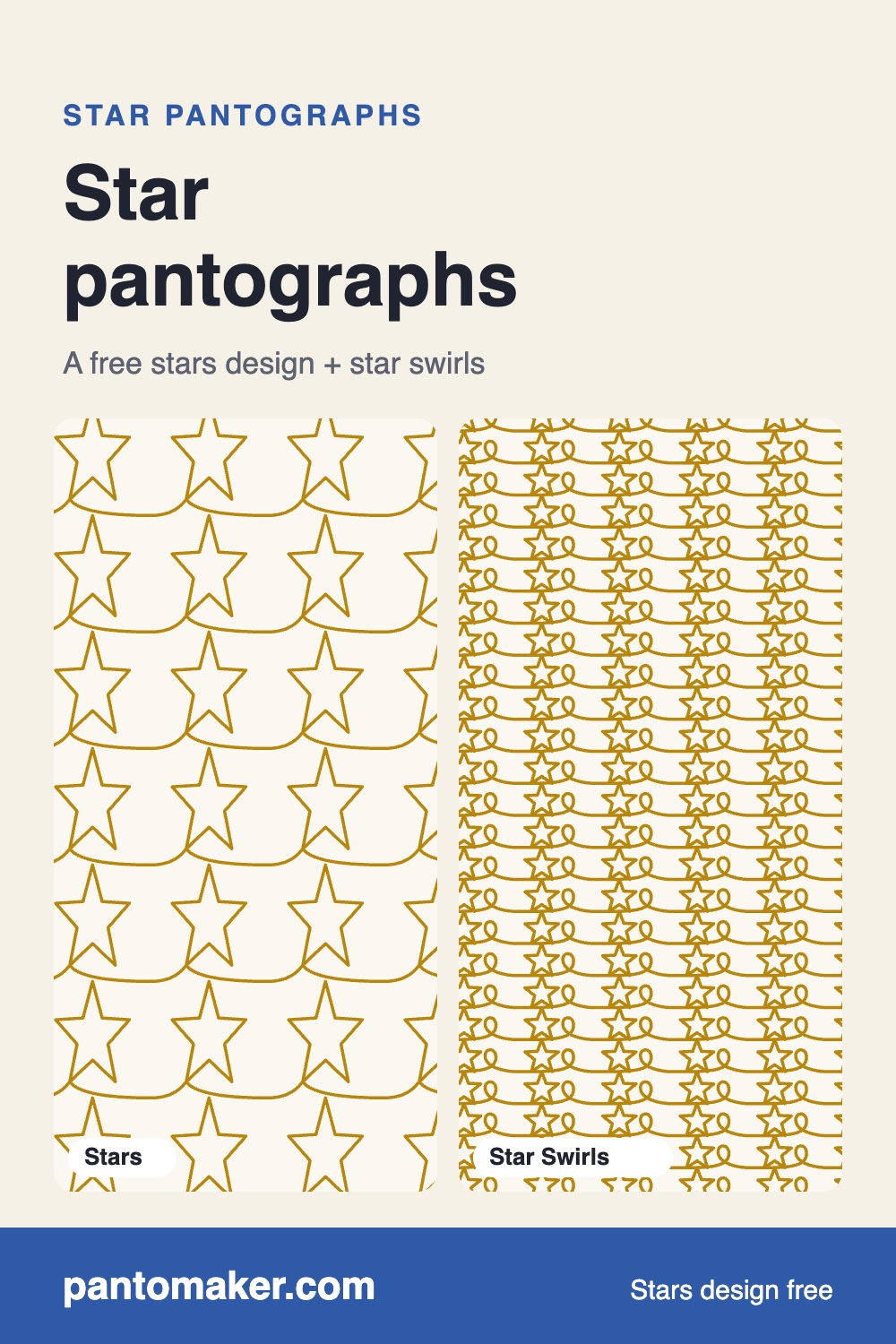
Star pantographs for longarm quilting
PantoMaker's Stars design is a free star pantograph, all year: one ZIP with a printable paper pantograph (PDF) for hand-guided quilting and digital files for computerized longarms (QLI, HQF, IQP, DXF, PAT, BQM and more). Stitch it on any quilt, including quilts you sell or donate. Below: how the line runs, how to size it, which quilts and threads it suits, and Star Swirls, a patriotic star design you can preview on your quilt (its files come with PantoMaker Pro).
Free star pantograph: Stars

The download is a 12 in repeat with 6 in rows and two stars per repeat, so the stars sit 6 in apart. The ZIP holds the paper pantograph and every machine file, so you don't have to pick a format first. To change the size, open Stars in PantoMaker; the classic designs are free at any size. More classic designs are free the same way in the free pantograph library.
How the line runs
A longarm stitches a pantograph as one unbroken line, so each star is drawn without stops or jump stitches:
- Into the star. The line runs along the baseline, then swoops up into the star's lower-left point.
- Around the outline. It traces the five-point star clockwise, all ten corners, and comes back to the same lower-left point. The star is an outline, not crossed lines through the middle, so it reads as a clean star shape.
- On to the next star. From that point the line curves back down under the star and along the baseline to the next one.
Each file is one repeat that starts at the left and ends level on the right, so your quilting software can repeat it across the row and stack the rows. At the library size the stars are about 4 in wide and 5 in tall, a little taller than wide, and their lowest points sit just under 1 in above the baseline. Spaced at their own height, the rows don't overlap: the top point of each star just reaches the baseline of the row above. Add a little Row spacing if you want more air between the rows.
Sizing a star pantograph
The download is 12 × 6 in. When you open the design, check Repeat width and Row height under Size: the designer opens at 12 × 7 in, or the size you used last, and fits the design to it, which stretches the stars. Type in 12 and 6 first, then tick Keep proportions and raise the width if you want bigger stars and fewer rows. The Star size setting (0.6 to 1.3) changes how full the stars are compared with the curve that joins them; watch the preview as you move it.
What that means on a 60 × 72 in throw, with rows running 2 in past each edge, as the designer lays them out, and spaced at their own height (numbers from PantoMaker's own layout code, rounded):
| Design | Repeat × row height | Rows | Stitching |
|---|---|---|---|
| Stars (free) | 12 × 6 in | 13 | about 105 yd |
| Stars (free) | 15 × 7.5 in | 11 | about 90 yd |
| Star Swirls | 12 × 1.65 in | 47 | about 300 yd |
| Star Swirls | 24 × 3.3 in | 24 | about 150 yd |
Keep the open spaces within your batting's maximum stitching distance (it's on the package). For row heights that fit your machine, see what size pantograph do I need.
Quilts it suits, and thread
- Quilts of Valor and patriotic quilts. Stars in navy, red or cream thread looks patriotic without being busy. Quilting a Quilt of Valor covers the size requirements and a worked row example with this design.
- Baby and charity quilts. Stars is simple and cheerful and suits most piecing, which makes it a good pick for Project Linus and NICU quilts; see charity quilt sizes.
- Christmas quilts. PantoMaker has no separate Christmas star design, but the free Stars in gold or red thread looks festive. For trees, ornaments and holly, see Christmas pantographs.
- Thread contrast. The stars are pictures, so a contrasting thread on a plain or low-contrast quilt shows them off; on busy piecing, a blending thread keeps them as a light texture.
More stars: Star Swirls
Star Swirls is one of PantoMaker's patriotic designs: small five-point stars, each followed by a loop-de-loop, three per repeat. At its library size, 12 × 1.65 in, it stitches as a dense all-over texture; double it to 24 × 3.3 in for a bolder row. Preview it across your own quilt free; the machine files and the paper pantograph are part of PantoMaker Pro.

Stars and Star Swirls on alternate rows
For a fuller patriotic look, stitch Stars on rows 1, 3, 5 and Star Swirls on rows 2, 4, 6. Open Stars, choose Alternate rows under Your design and pick Star Swirls. Both get the same repeat width and row height so the rows line up, which means Star Swirls is stretched to the Stars row height; compare a few row heights in the preview until both look right. The preview is free; downloading alternate rows is part of PantoMaker Pro.
Printing a paper star pantograph
The free Stars ZIP includes a paper pantograph. Print it at 100% / actual size, check the 1-inch square on the first page, then tape the sheets together. For A4, a longer pantograph or one long page from a print shop, set the paper in the designer; how to print a paper pantograph walks through it.
Draw your own star design
For a different star, a shooting star or a star with a trail, draw it in PantoMaker as one continuous line, or open an SVG you drew elsewhere, and preview it across your quilt for free. How to design a pantograph covers the rules (one line, left to right, ending level). Downloading your own design is part of PantoMaker Pro.
Before you stitch
As with any new pantograph, load it on your machine, check the size your software shows, and stitch a test row on scrap with the same batting and thread. If something looks wrong, email support@pantomaker.com with your machine and software version.